

Our score
9.2/10
Source
CGReviewHub
Category
General
Editorial review
Our honest review
TradeSyncer Review (2026): Features, Pricing, Setup Guide & Competitor Comparison

Managing multiple Prop Firm or Futures trading accounts simultaneously is notoriously challenging. Technical glitches, complex software installations, high VPS overhead, and high execution latency are constant headaches for modern traders.
TradeSyncer addresses these pain points with a fully cloud-based trade copying and account management platform . In this comprehensive review, we examine TradeSyncer’s core features, pricing options, step-by-step setup process, pros and cons, and how it measures up against popular alternatives .
1. What is TradeSyncer?
TradeSyncer is a cloud-based trade copier and risk management software built specifically for Prop Firm and Futures traders .
Unlike traditional trade copiers that require bulky local software installations or 24/7 Virtual Private Servers (VPS), TradeSyncer runs entirely inside your web browser . By connecting your accounts via secure API endpoints or login credentials, the platform mirrors trades from a designated "Leader" account to multiple "Follower" accounts in real time with ultra-low latency .
2. Key Specifications & Overview
100% Cloud-based (Browser Accessible)
Execution SpeedUltra-low latency (Average < 100ms)
VPS RequirementNo VPS required / No computer needs to stay open
Tradovate, Rithmic, NinjaTrader, TradingView, dxFeed, and more
Target AudienceProp Firm Traders, Futures Traders, Account Managers
3. Core Features Analysis
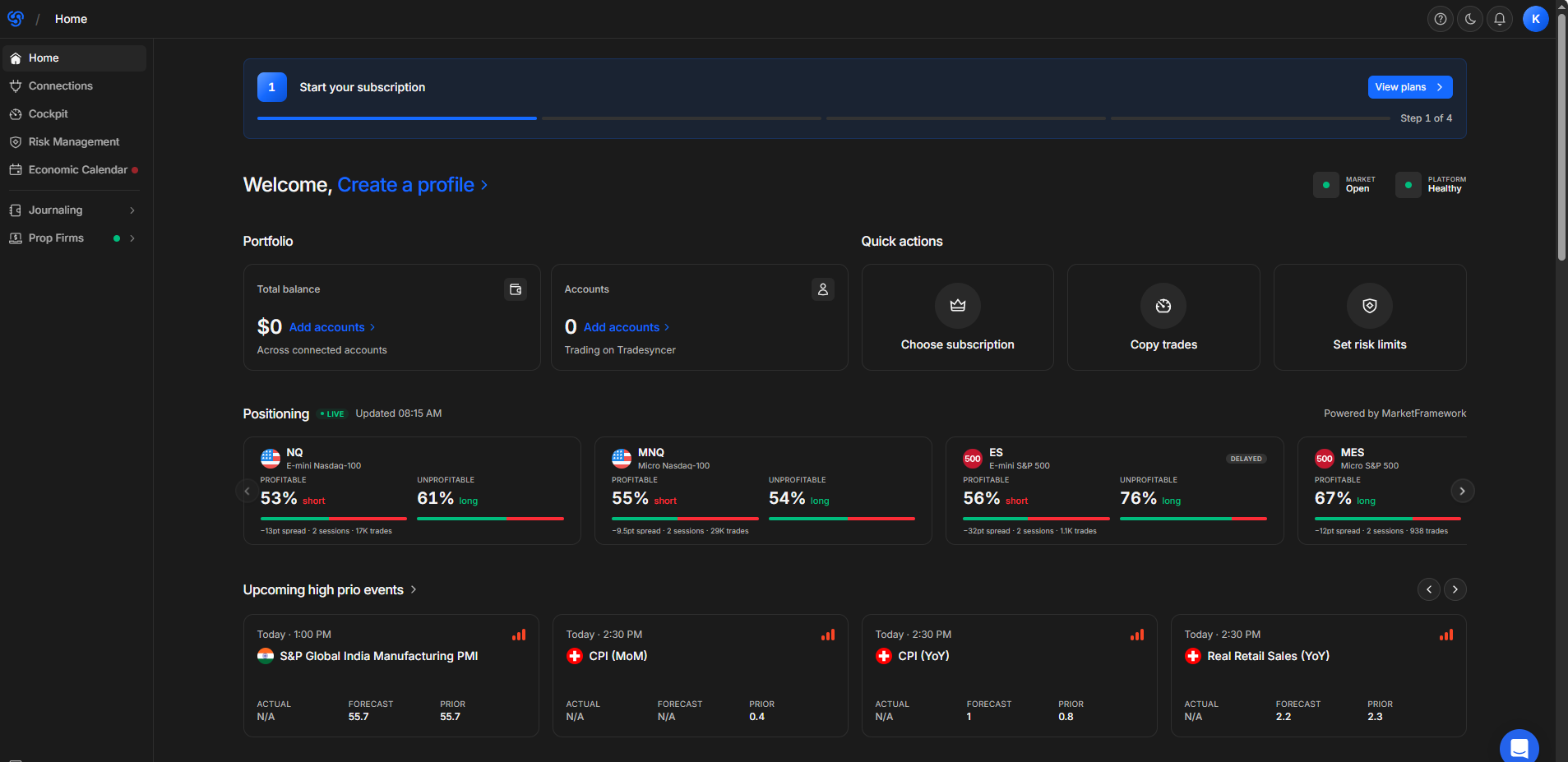
3.1. Lightning-Fast Cloud Trade Copier (Zero VPS Needed)
TradeSyncer removes the need for monthly VPS maintenance and avoids local software crashes . Trades are synchronized directly at the server level, ensuring minimal slippage and immediate order execution across all follower accounts .
3.2. Built-In Prop Firm Risk Controls
Maintaining compliance with strict Prop Firm rules (e.g., Daily Drawdown limits) is critical. TradeSyncer includes automated safeguards:
-
Daily Loss Limit Auto-Lock: Automatically liquidates open positions and locks trading when a predetermined loss threshold is hit .
-
Profit Target Protection: Disables further trading once daily profit goals are achieved to lock in gains .
-
Flexible Position Sizing: Custom multipliers allow proportional lot sizing based on varying account balances across different prop accounts.
3.3. Multi-Broker & Platform Compatibility
TradeSyncer connects with leading data feeds and trading platforms, including Rithmic, Tradovate, NinjaTrader, TradingView, and dxFeed . Centralizing account control under a single dashboard simplifies portfolio management .
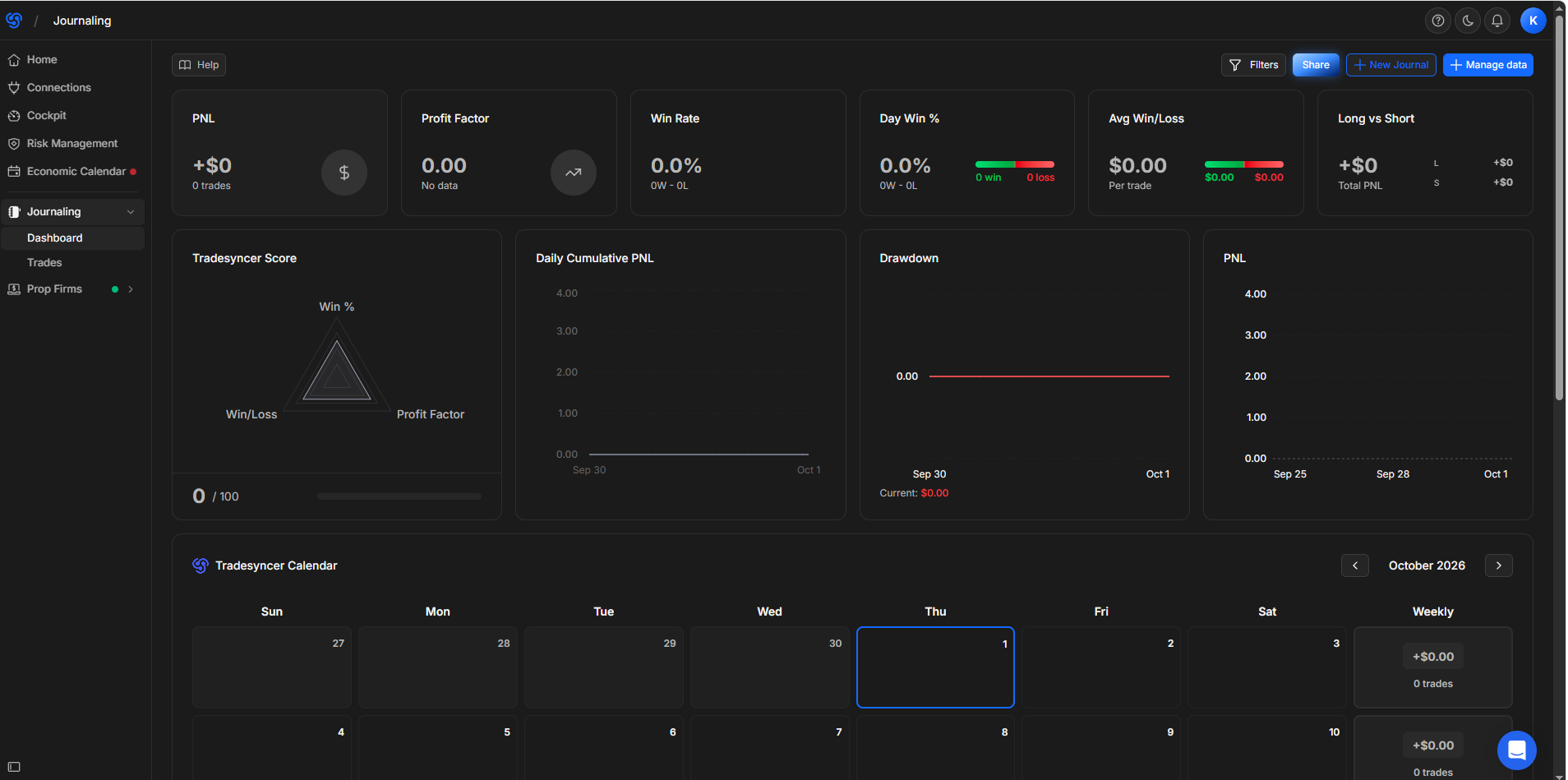
3.4. Automated Trading Journal
Every trade is recorded automatically, calculating essential metrics such as Win Rate, Profit Factor, Average Risk-to-Reward Ratio, and Drawdown levels .
4. How to Set Up TradeSyncer in 4 Simple Steps
Setting up TradeSyncer requires no coding or software downloads .
┌─────────────────────────┐      ┌─────────────────────────┐
│  Step 1: Create Account │ ───► │   Step 2: Connect APIs  │
└─────────────────────────┘      └─────────────────────────┘
                                              │
                                              ▼
┌─────────────────────────┐      ┌─────────────────────────┐
│   Step 4: Start Copying │ ◄─── │  Step 3: Define Groups  │
└─────────────────────────┘      └─────────────────────────┘
-
Step 1: Sign Up & Access Dashboard
Create your TradeSyncer account and log in to the web dashboard .
-
Step 2: Connect Trading Accounts
Add your trading connections (e.g., Tradovate, Rithmic, or TradingView) by entering API keys or login credentials .
-
Step 3: Create Copier Groups
Assign one primary account as the Leader and select one or more accounts as Followers. Adjust individual lot sizing multipliers as needed .
-
Step 4: Set Risk Controls & Activate
Define your daily loss and drawdown limits, toggle the copier "ON," and begin trading .
5. TradeSyncer vs. Signal Trade App
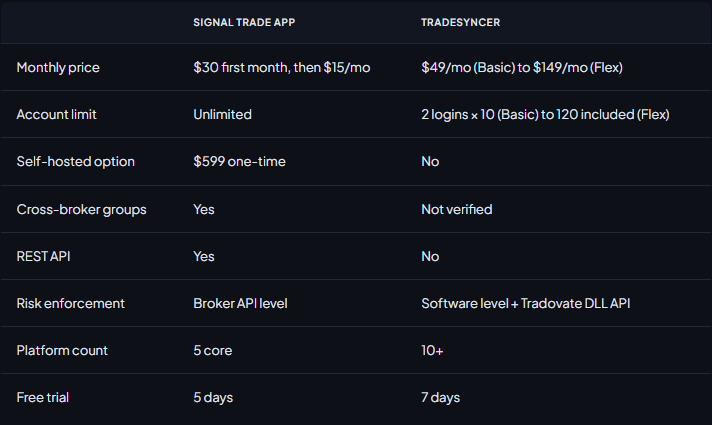
</span></div><p><br></p><div><span><span><span>**</span>Key differences at a glance:<span>**</span>
### Which one should you choose? Choose TradeSyncer if:
- You trade across many platforms. It supports 10+ platforms, against 5 core platforms for Signal Trade App.
- You want built-in risk controls, with enforcement at the software level plus the Tradovate DLL API.
- You prefer a longer free trial (7 days vs 5 days) to test the copier with your own prop firm accounts.
Consider Signal Trade App if:
- Price is your top priority. Its monthly cost is much lower, and it offers unlimited accounts. - You need a REST API or a self-hosted option ($599 one-time). - You rely on cross-broker groups, which we could not verify on TradeSyncer.
### Our take
TradeSyncer costs more, but it is the stronger choice for traders who want broad platform coverage and ready-made risk controls without maintaining a VPS (typically $20 to $50 per month). Signal Trade App wins on price, account limits and developer features. For most prop firm traders running a handful of accounts, TradeSyncer's ease of use is worth the premium. High-volume traders on a tight budget should test both during their free trials.
6. Pros and Cons
Pros
-
Complete Convenience: Runs 100% in the cloud without requiring a running PC or VPS .
-
Ultra-Low Latency: Fast server-side execution minimizes slippage across accounts .
-
Prop-Firm Friendly: Auto-lock risk rules help prevent rule violations .
-
Intuitive Dashboard: Clean, user-friendly interface designed for rapid navigation .
Cons
-
Requires active API access and stable connection from broker platforms.
-
Monthly subscription cost (though offset by saving on VPS expenses).
7. Pricing Structure
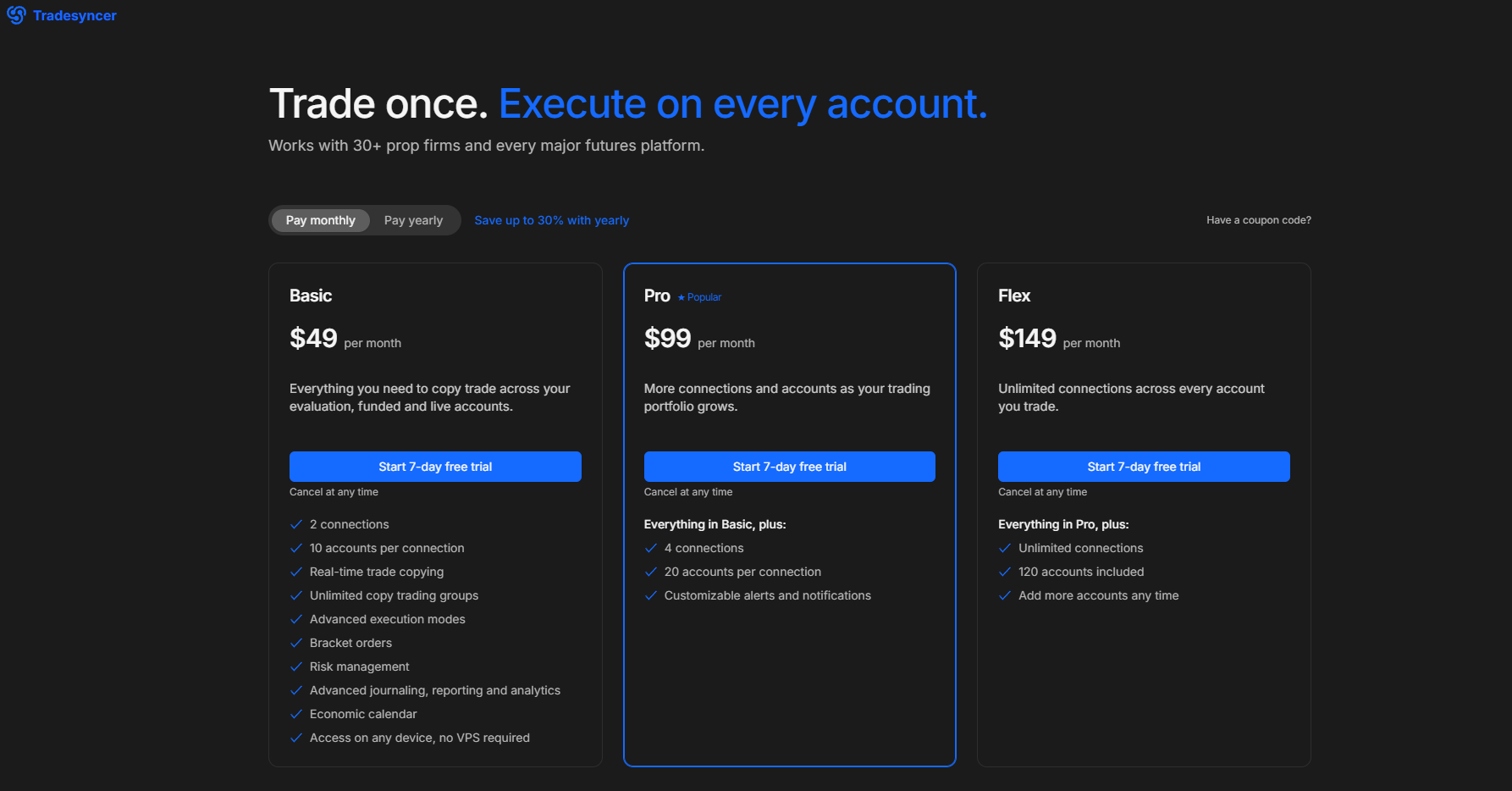
TradeSyncer offers tiered subscription plans tailored to different trading scales:
-
Starter Plan: Ideal for retail traders managing 2–3 active accounts.
-
Pro Plan: Optimized for active Prop Firm traders handling 5–10 accounts simultaneously.
-
Ultimate Plan: Designed for professional account managers or small funds managing large account groups.
8. Final Verdict: Is TradeSyncer Worth It?
For Prop Firm and Futures traders managing multiple accounts, TradeSyncer provides a streamlined, reliable cloud-based solution . Eliminating VPS overhead while providing server-side execution speed and automated risk management makes it a valuable tool for maintaining trading consistency and account safety .
Frequently Asked Questions (FAQ)
Q1: Does TradeSyncer require my computer to remain open while trading?
No. TradeSyncer runs entirely on cloud infrastructure . Trade execution occurs server-side, even if your local computer or web browser is powered off .
Q2: What is the average trade execution speed?
Execution latency averages under 100ms, minimizing slippage between Leader and Follower accounts .
Q3: Is TradeSyncer compatible with Tradovate and Rithmic?
Yes. TradeSyncer natively supports popular protocols and data feeds, including Tradovate, Rithmic, NinjaTrader, TradingView, and dxFeed .
If you are managing multiple prop firm accounts and want to eliminate VPS costs while securing sub-100ms execution, TradeSyncer is one of the best investments you can make for your trading operations.
🚀 [Get Started with TradeSyncer Now ➔]
(Includes instant access to all premium risk management tools & cloud sync features)
What we like
- 100% Cloud-based platform (No VPS or local software installation required)
- Ultra-low execution latency (under 100ms) minimizes slippage
- Built-in advanced risk management & automated auto-lock controls
- Supports major platforms like Tradovate, Rithmic, NinjaTrader, TradingView
- Automated performance journal with detailed metrics
What could improve
- Requires stable API connections from third-party broker platforms
- Requires a recurring monthly subscription plan